While running a Shopify store, you have to make buying easier for the customer and protect your margins at the same time. One of the proven and effective options for this is providing an automatic discount. A reliable Shopify discount app can make things easier for you with flexible discount rules and better overall control.
If you are still wondering, “what is a Shopify automatic discount?”, here is a full guide with relevant information. Learn how to create automatic discounts and more. Keep on reading.
What is a Shopify Automatic Discount?
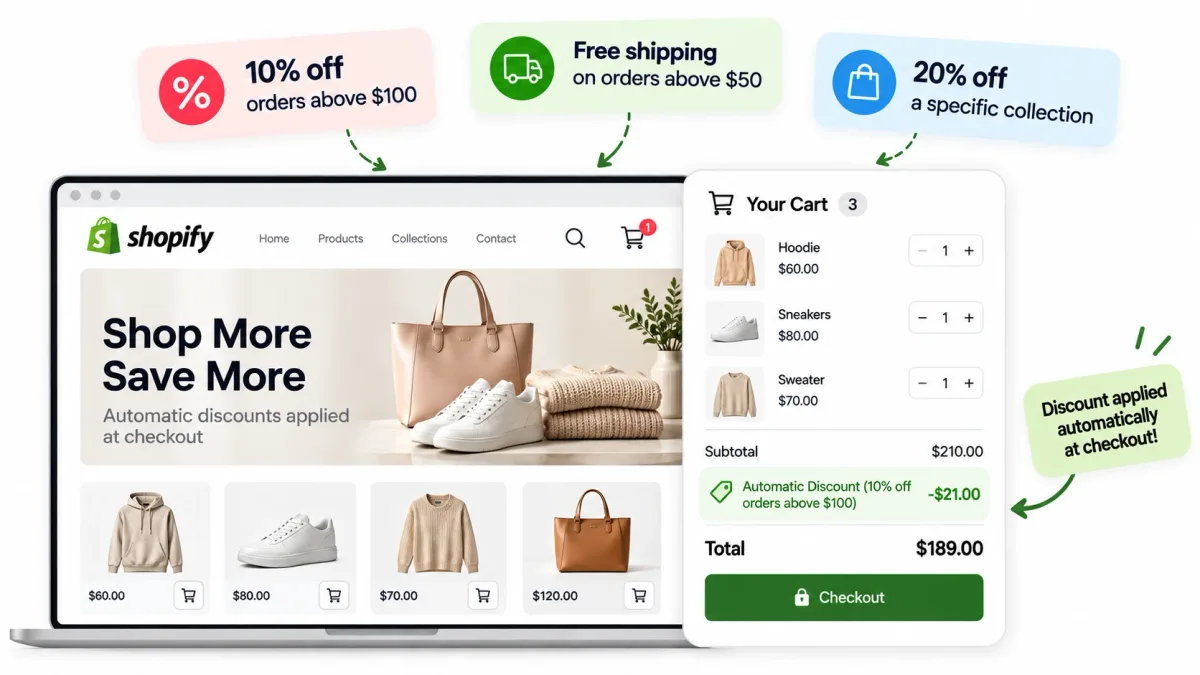
A Shopify automatic discount is a discount that is applied to the customer’s cart and checkout automatically based on certain preset conditions. If the customer’s purchase meets these conditions, they are automatically eligible for the discount. It is not like a traditional discount where the customer has to manually type and enter a code to be deemed eligible.
For example:
- 10% off orders above $100
- Free shipping on orders above $50
- 20% off a specific collection
Automatic promotions are designed to remove an extra step from the whole buying process. Therefore, it is important to understand “what is a Shopify automatic discount?”. According to Shopify, automatic discounts are commonly used for site-wide sales, bulk purchases, and specific collections.
Types of Automatic Discounts in Shopify
There are many different types of automatic discounts that Shopify merchants use.
| Discount Type | How It Works | Common Use |
|---|---|---|
| Percentage Off | A certain percentage is taken off eligible products or orders | Seasonal sales |
| Fixed Amount Off | Removes a specific amount of money on orders | Spend and save promos |
| Free Shipping | Removes shipping costs on eligible offers | Increases the order value |
| Buy X Get Y | A qualifying item is purchased to get another item for free or at a discount | Product promos |
What are the Benefits of Automatic Discounts for Shopify Stores?
One of the top benefits of automatic discounts Shopify store owners can enjoy is the simplified customer experience. Your shoppers do not have to remember, copy, or enter a code. There are multiple other benefits, such as:
Reduced checkout friction
Every extra step in the purchasing process is actually opening up an opportunity for the customer to leave. Automatic discounts make the promotion available to the customer as soon as they meet the required conditions.
They can learn about the conditions of the promo, make their purchase align with it, and get the discount applied instantly.
Easier promotional campaigns
It is simple to schedule and configure automatic discounts. You can apply them only to specific products or collections, or the whole store. You can choose customer eligibility, purchase requirements, and more. Decide everything and set the campaign once.
Higher order values
You might have seen offers like “10% off on $100 orders”. Customers will be willing to spend $100 to get the 10% off. It encourages the shopper to buy for a higher value.
Fewer coupon-entry mistakes
A coupon-entry mistake is a classic that has happened to every shopper at least once. With automatic discounts, they do not have to manually enter anything. There is no code to type in, so there is no chance of mistakes.
Even if a shopper forgets about the offer, they still get it. Even if a new shopper does not know about the offer, they still get it. That is what makes automatic discounts so great.
How to Create Automatic Discounts in Shopify?
If you are looking for how to create automatic discounts, the process is actually quite simple. You can carry it out through Shopify admin. Here is a step-by-step guide that you can follow.
Step 1: Open the Discounts Section
- Log in to your Shopify admin
- Go to “Discounts”
Step 2: Create a New Discount
- Click on “Create Discount”
- Select the appropriate discount method
Shopify lets you create automatic discounts along with discount codes.
Step 3: Choose your Discount Type
Choose the type of discount that you are planning to offer:
- Percentage discount
- Free shipping promotion
- Fixed amount discount
- Buy X Get Y
Step 4: Set the Discount Value
- Enter the percentage of discount you are willing to offer for percentage discounts
- Enter the monetary amount for fixed amount discounts
- Enter or define the qualifying products and the products a customer can receive for Buy X Get Y offers
Step 5: Set Eligibility Requirements
- Set eligibility
- Choose which products, customers, collections, or markets are eligible
- Set minimum purchase requirements, if applicable
Step 6: Configure Discount Combinations
- Set combination settings for each discount
- Choose which discounts are eligible to be combined
You need to individually configure the combination settings for each active discount.
Step 7: Set the Active Dates
- Add the start date of the promo
- Add the end date of the promo
- Schedule the campaign dates
Scheduling is important, as you do not have to manually activate or deactivate the campaign.
Step 8: Save and Test the Promotion
- Save the automatic discount
- Test it with a qualifying cart
Testing each promotion before you offer it to customers is very important. It is the only way to make sure that everything is working correctly. You have to test the eligibility, product selection, minimum requirements, and combination rules. Only when the test is successful can you say that you have learnt how to create an automatic discount completely.
How to Use Automatic Discounts Without Hurting Your Margins?
All the benefits of automatic discounts Shopify store owners can enjoy can become a pain real quick if promotions are not properly controlled.
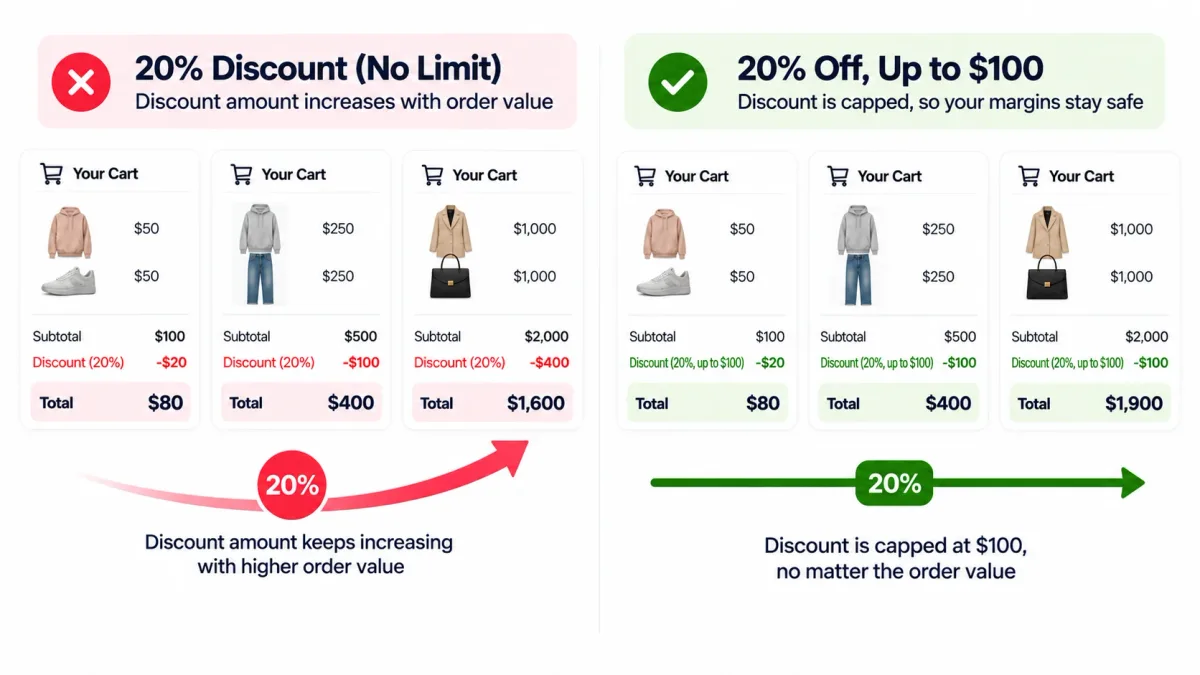
For example, consider someone giving a 20% discount on orders. If a customer purchases for $100, they get a $20 discount.
But what will happen if you do not limit the purchase eligibility to $100 orders only?
- If a customer makes a $500 order, they get a $100 discount
- If a customer makes a $2,000 order, they get a $400 discount
The percentage is still only 20%. But with the increase in the order value, the cost of the promotion is increasing dramatically. That is why you should define the offer accurately as:
“20% off, up to $100”
In this case, if a customer makes a $2,000 order, they will only get $100, not $400.
This is where a specialized Shopify discount app like NexDiscount can provide the additional flexibility that you need.
Why NexDiscount?
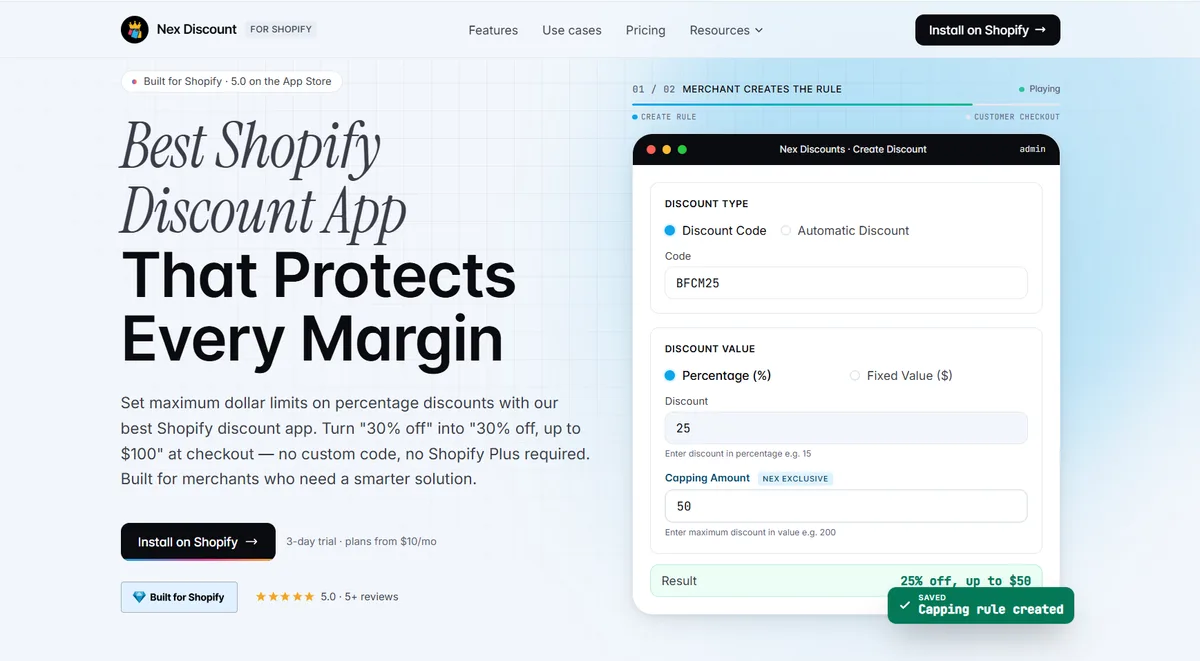
NexDiscount allows merchants to create percentage discounts with a maximum dollar cap. So merchants are able to offer attractive percentage promotions while limiting the maximum amount they give away.
In addition, it supports advanced discount conditions and product targeting. So it is easy for you to build a promotion around any specific products, variants, or customer requirements.
Conclusion
Automatic discounts can make Shopify promotions easier for customers to use and simpler for merchants to manage. There are several types of automatic discounts available for different promotional goals like free shipping, percentage, and fixed value offers.
Once you know how to create automatic discount promotions, you can run better campaigns. For Shopify stores that need more control over discount conditions and maximum discount values, NexDiscount provides an additional layer of flexibility.
FAQ
Can I have more than one automatic discount active at a time?
Yes, Shopify allows up to 25 active automatic discounts. It can include app-based discounts as well. However, multiple discounts can be combined only if the settings allow it.
Which is the best Shopify automatic discount app?
The best Shopify automatic discount app is based on your goals and needs. NexDiscount is an app that suits almost everyone, especially merchants who need advanced features like capped percentage discounts, subscription discounts, and product targeting.
Can I create automatic discounts for specific customers?
Yes, Shopify does let you create automatic discounts only for specific customers or customer segments. Merchants can create targeted promotions instead of having to offer discounts to all shoppers.
Can Shopify automatic discounts apply to specific products or collections?
Yes, you can configure eligible automatic discounts to apply to specific products or collections only. This can be more useful for promoting selected products or seasonal collections than your entire store.