
Using discounts is a powerful way to provide more value to shoppers. But what should you do when a customer wishes to use more than one offer in one purchase? This is where a Shopify discount app becomes relevant. The built-in discount combination features in Shopify are extremely useful too.
According to the Baymard Institute, around 70% of online shopping carts are abandoned. The top reasons are shipping costs, taxes, and other additional fees. Shopify does allow merchants to combine discounts, but that does not mean you can stack every discount together.
This is a guide where we explain Shopify discount combinations in simple terms, with examples, rules, benefits, limitations, and setup instructions.
What Are Shopify Discount Combinations?
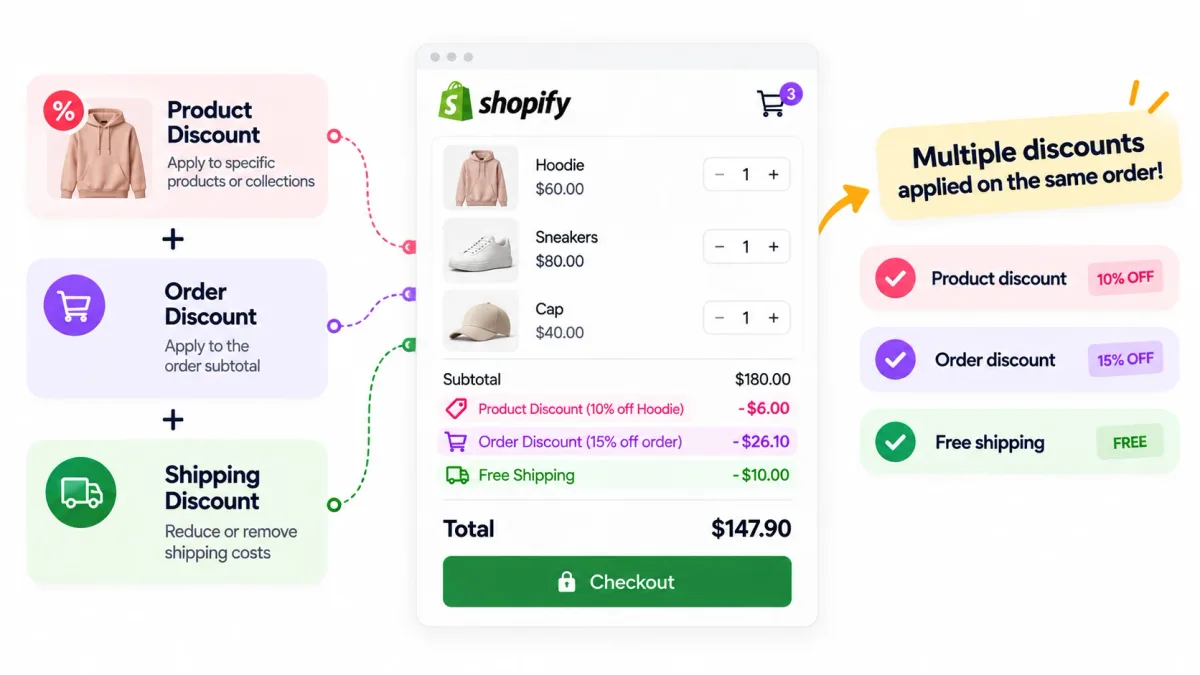
Shopify discount combinations allow eligible discounts to be combined and used on the same order. For example, a customer can receive a product discount and free shipping.
Shopify discounts are divided into three main categories:
- Product discounts: Apply to only certain products or collections
- Order discounts: Apply to the order subtotal
- Shipping discounts: Reduce or remove shipping costs
Note that just because more than one discount is active, it does not mean they are automatically combined. For that, the right combination settings have to be enabled.
Is discount stacking the same as discount combination?
These two terms are often used interchangeably. Let us see what each means. “Discount stacking” means applying multiple promotions to one purchase. “Discount combination” is the official term used by Shopify to refer to this feature.
Types Of Discount Combinations
Shopify currently supports six main combination scenarios. However, some combinations have eligibility or Shopify Plus requirements.
| Combination | Availability | Example |
|---|---|---|
| Order + Free shipping | Available | 10% off order + free shipping |
| Product + Free shipping | Available | 20% off product + free shipping |
| Product + order | Eligible merchants | 20% off shoes + 10% off entire order |
| Order + order | Eligible merchants | 10% off + $20 off qualifying order |
| Product + product on different items | Available | 20% off shoes + 10% off shirts |
| Product + product on the same item | Shopify Plus only | Loyalty discount + seasonal discount |
Examples of Combined Discounts
What is an example of a product and shipping combination?
Let’s say a customer purchases:
- Shoes for $100
- Shirt for $50
The store offers $20 off the shoes and free shipping on all orders above $100. First, the product discount is applied, which reduces the shoes to $80. Then the cost of the shirt is added, $80 + $50, which is above $100. So it qualifies for free shipping.
How do two order percentage discounts work?
Imagine a $100 order is eligible for two combinable percentage discounts: 10% off and 20% off.
Shopify calculates both percentage discounts against the original subtotal of $100. Thus, the total discount is $30 and the subtotal is $70. Note that the 20% discount is not applied to the already reduced $90.
Can two shipping discounts be combined?
No. Shopify does not allow applying multiple shipping discounts to the same order.
Can a product discount and order discount be combined?
It is available for eligible merchants.
- Product discount: $20 off a $100 pair of shoes
- Order discount: 10% off the order
- Original cart subtotal: $350
First, the product discount is applied:
- New subtotal: $330
- 10% order discount calculated: $33 reduction
- Final subtotal: $297 before shipping
How to Combine Discounts on Shopify?
Setting up discount combinations requires configuring discounts individually. Here is a simple step-by-step guide to learn how.
Step 1: Open Discounts
- Go to Shopify admin
- Go to Discounts
- Select an existing discount, or create a new one
Step 2: Find the Combinations section
- Go to discount settings
- Go to Combinations
- Choose the discount classes the promo can be applied to
Step 3: Configure the Second Discount
Configure the second discount settings similarly in the combination settings.
Step 4: Save Changes
- Review the combination settings of both discounts
- Save both discounts
Step 5: Test the Promotion
- Add eligible products to the cart
- Test the promotion
Test the following:
- Both discounts appear
- Eligibility requirements are met
- The correct discount amount is calculated
- Shipping is handled correctly
- Excluded products remain excluded
Testing the promotion is as important as configuring the combination settings, especially when discount codes, multiple automatic discounts, product restrictions, and third-party apps are involved.
Benefits of Using Shopify Discount Combinations

Combinations can always provide more flexibility to merchants. The benefits of Shopify discount combinations are as follows:
Create targeted promotions
Different incentives can be combined for different parts of an order. This is much better than offering one broad discount. To exemplify, a product promotion can target a specific product or collection. At the same time, a shipping offer applies to all qualifying orders.
Support different promotional campaigns
When several campaigns overlap, combinations can be useful. A free shipping campaign, a loyalty offer, or a seasonal product promotion can be structured together so that eligible promotions work together. So there is no need to compete unnecessarily.
Improve the perceived value of an offer
Customers find a promotion more compelling when they receive more than one type of saving. Shopify’s 2025 Holiday Research found that 49% of shoppers said discounts were a factor in earning their loyalty. Another 41% cited free shipping and returns as factors.
Create a smoother checkout experience
When promotions are configured correctly, customers can see their savings. At checkout, their eligible savings are applied automatically. It means they do not have to manually try multiple incompatible codes.
Give more control to merchants
Allowing every discount to stack provides little to no control. Combination settings let the merchant decide which discount classes can interact.
Limitations for Discount Combinations
Here are the current restrictions that Shopify applies:
- Stores can have a maximum of 25 active automatic discounts. This also includes app-based discounts.
- Customers can only use up to 5 product or order discount codes and 1 shipping discount code on an order.
- Buy X Get Y promotions have additional restrictions.
- Multiple shipping discounts cannot be combined.
- To provide multiple product discounts on the same line item, Shopify Plus is required.
- Product + order and order + order combinations have certain eligibility requirements.
- Third-party discount apps may have different compatibility conditions based on their discount creation.
- Discount combinations cannot be accessed through external checkout experiences. This includes Google, Facebook, and Instagram.
Discount Combination Rules
There are some rules that determine how Shopify applies discounts.
The top rule is the order in which discounts are calculated. They are generally processed in the following sequence:
- Product discounts: Applied to individual products
- Order discounts: Applied to the revised subtotal after product discounts
- Shipping discounts: Applied at the end
So the order in which discounts are calculated will definitely have an impact on the final price.
Incompatible discounts cannot be combined
Just because there are two discounts, Shopify does not allow combining both of them. If they are incompatible with each other, the better eligible discount is selected.
For example, there are two discounts: 20% off and $30 off. The discount that provides better value to the customer is determined by Shopify.
What to do if your discount combination is not working?
You can check the following if your discounts are not working:
- Eligibility: Check that customers, products, order value, and any other conditions satisfy both promotions.
- Combination settings: Check that both discounts allow the relevant discount classes.
- Checkout configuration: Certain checkout configurations can affect the eligibility of discount combinations.
- Automatic discounts: Sometimes an existing automatic discount might be competing with the code entered by the customer.
- Third-party apps: Apps that are used to create or modify discounts have their own compatibility requirements.
- Discount limits: Check whether the order or the store has reached the applicable discount limits.
- Buy X Get Y promotions: These promotions have additional rules around applying product discounts.
Conclusion
Shopify discount combinations give merchants a structured way to allow eligible promotions to work together. To determine which offers can be applied, Shopify uses discount classes, combination settings, eligibility requirements, and checkout rules. As a merchant, the goal is not to offer as many discounts as possible, but to create relevant combinations. Tools like NexDiscount are useful for this.
FAQ
Can I use multiple discount codes on Shopify?
Yes. Shopify allows customers to use multiple discount codes when the discounts are configured to combine and the order meets their eligibility requirements.
Can Shopify automatically apply multiple discounts?
Yes. Shopify can automatically apply eligible discounts when their combination settings allow them to work together. If discounts cannot be combined, Shopify applies the best eligible discount or combination.
How many discounts can be combined in Shopify?
Customers can use up to 5 product or order discount codes and 1 shipping discount code on the same order. Other combination rules and eligibility requirements may apply.
Can you combine product and shipping discounts on Shopify?
Yes. Shopify allows product discounts and shipping discounts to be combined when both discounts are eligible and configured for combination.